
Psalm/Worktop fabricators
For worktop fabricators
Psalm prices each piece from its length and width, puts every cut-out and upstand on its own line, takes the deposit that books your templating slot, and tells you who still owes the balance. It was built inside a working fabricator.
14 days free, no card. Then £39 a month for three people.
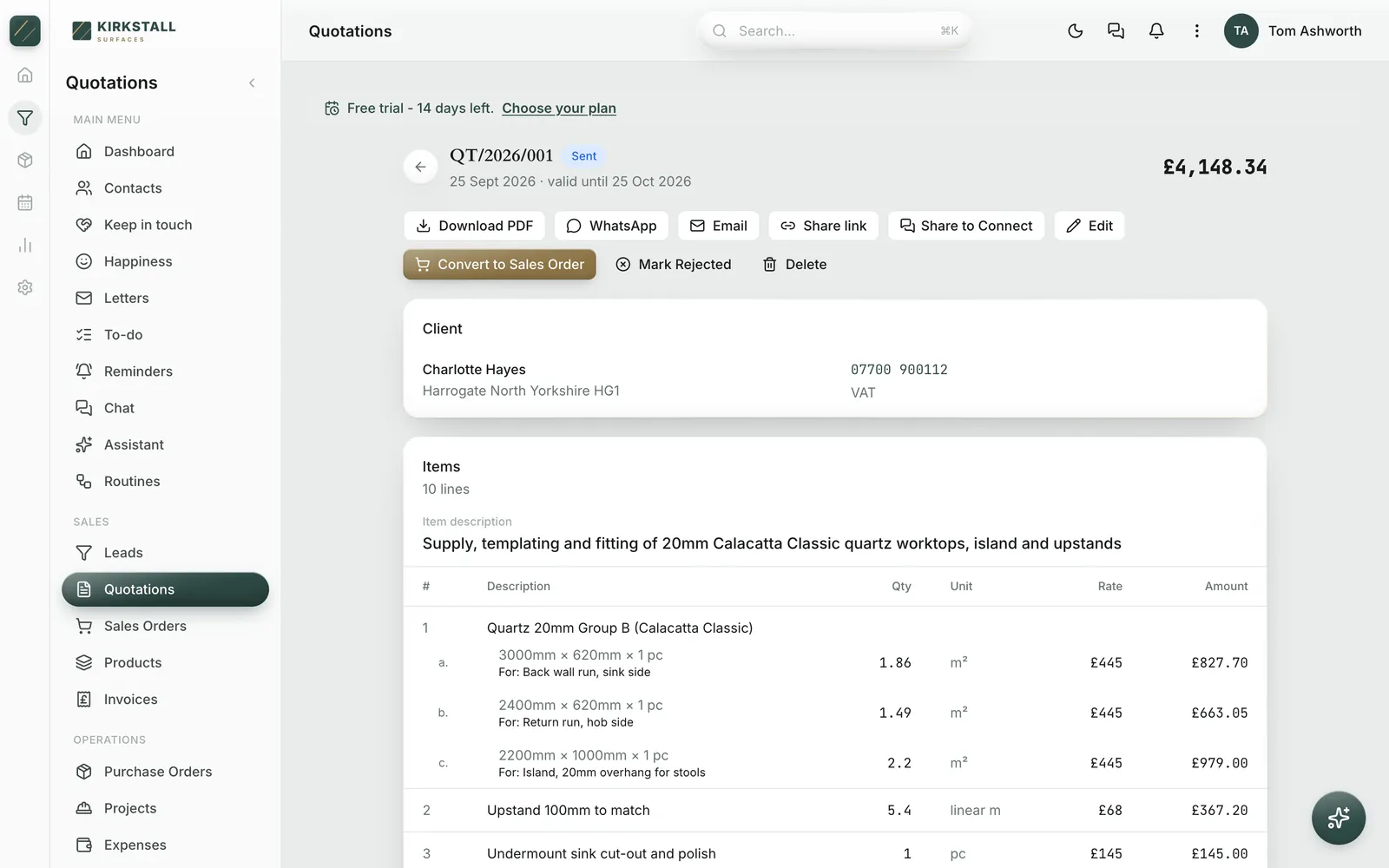
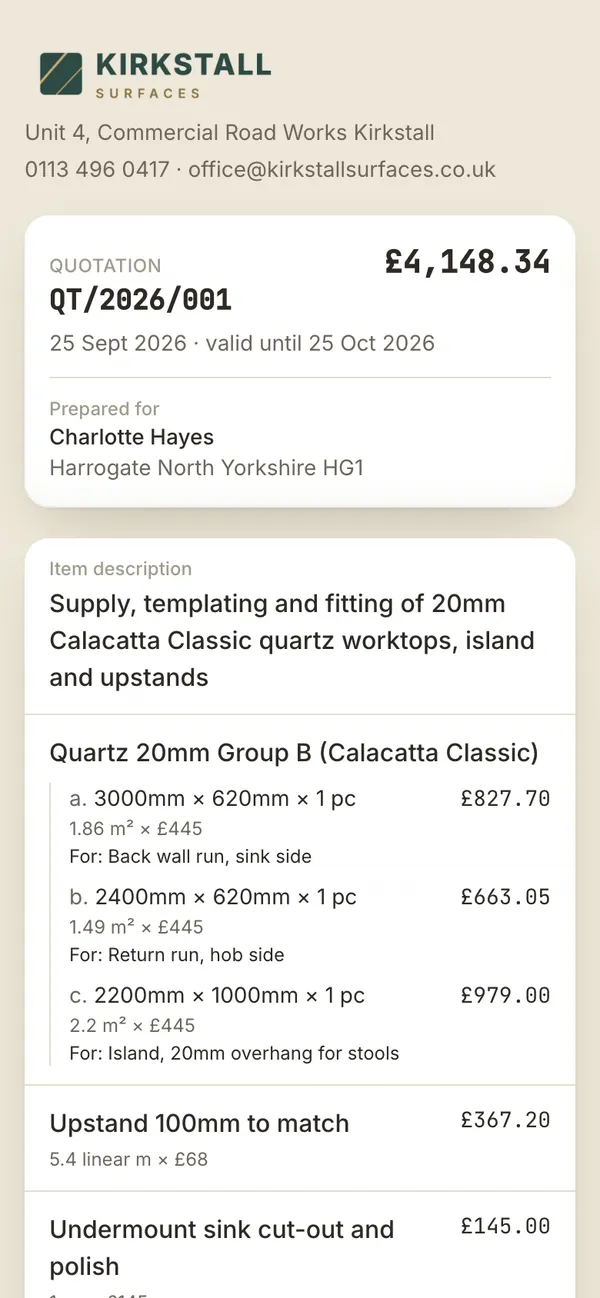
Real Psalm screens, photographed in a demo workspace we set up as a Leeds fabricator. Kirkstall Surfaces and its customers are invented. The software is not.
The quotation
A worktop is priced in two parts: square metres of material at the rate for that stone and thickness, then everything you do to it. Psalm quotes it the same way.
Type a piece as 3000 by 620 millimetres and Psalm works out 1.86 square metres at your rate for 20mm Calacatta Classic. Add the return and the island as further sizes of the same material and they sit together under one heading, lettered a, b and c, each with a note saying what it is for: back wall run, hob side, island with a 20mm overhang for stools. The sizes print exactly as you typed them. Nothing is rounded into inches on the way.
Upstands go on by the linear metre. The undermount sink cut-out and polish, the hob cut-out, tap holes, drainer grooves, the templating visit and taking the old tops away each sit on their own line at your price, so the customer can see what they are paying for and you can see what you charged for. VAT at 20% is worked out underneath as a single line, to the penny.
Your price list goes in once. At setup, hand Psalm the spreadsheet you already keep, with the stone, the unit and the price, and every item arrives priced and ready to pick. Your customer list comes in the same way. Measuring in a new build with no signal? Write the quote anyway: it saves on the phone and takes its number the moment you are back online.
Sending it
Send the quotation by WhatsApp, by email or as a link. The link opens a clean page with your logo at the top, every piece listed with its sizes, the total with VAT, your terms, and two buttons: accept or decline. The customer can add their name and a note, such as which day suits for templating, and the moment they press accept, Psalm tells you. The quotation records who said yes and when.
If templating finds a wall 40mm out, revise the quotation with the measured sizes. The version the customer was first sent is kept, and the link they already hold tells them it has been updated, so nobody can accept a price you have moved on from.
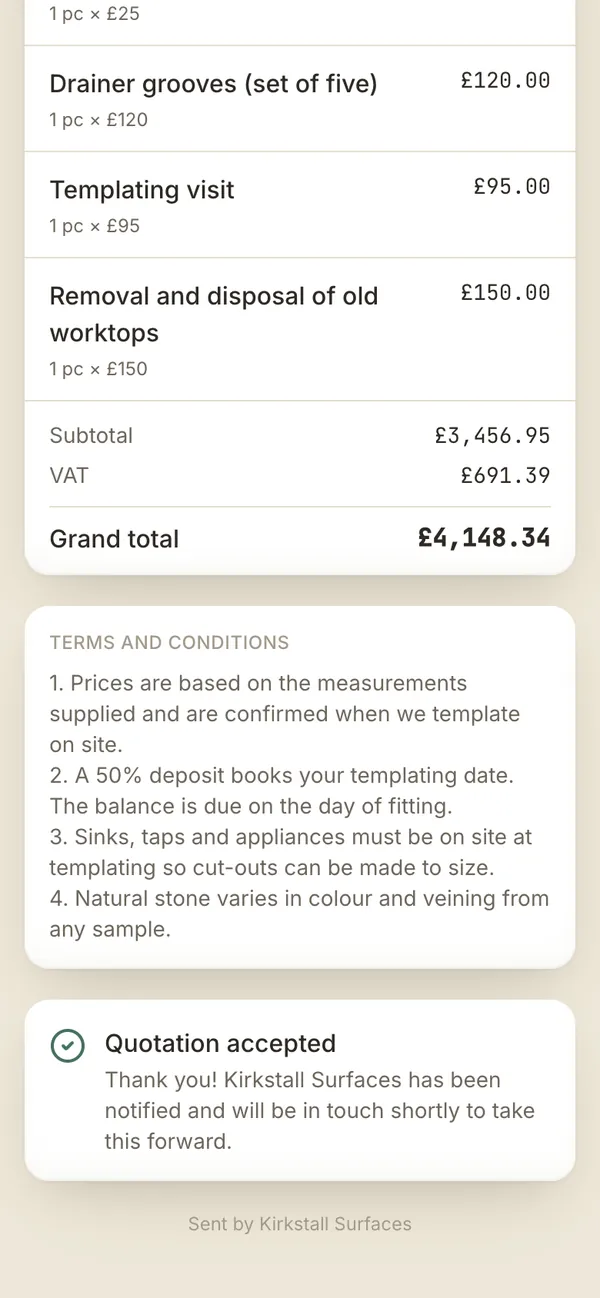
Deposit to balance
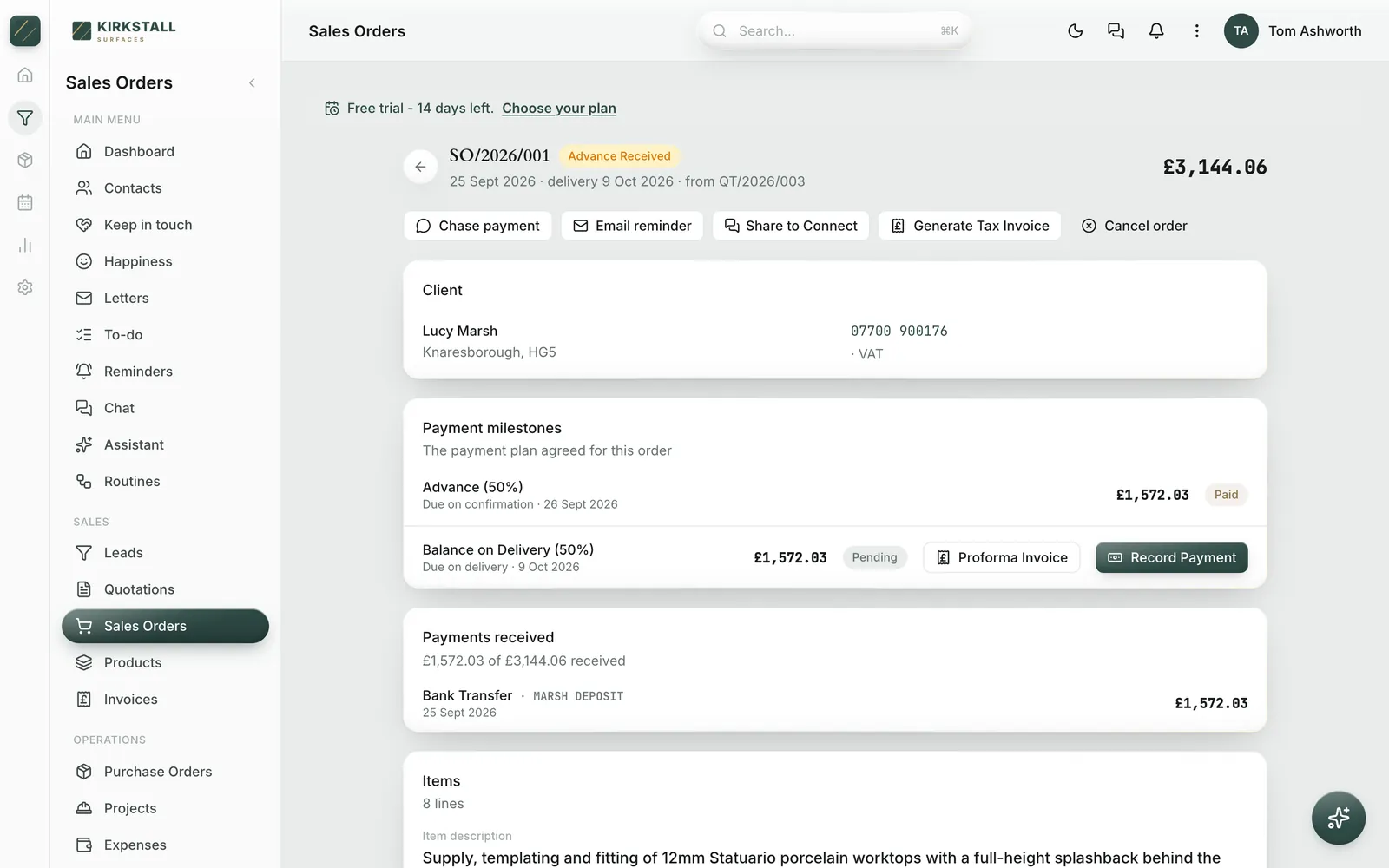
When the customer accepts, turn the quotation into an order with one press. Choose the deposit, half or whatever you work to, and set the fitting date. Psalm splits the total into the deposit due now and the balance due on fitting day, and every line and price comes across without retyping.
Need to ask for the deposit in writing? Print a proforma invoice for it. When the money lands, record it and the order reads Advance Received. The balance waits with its date on it, and Psalm reminds you when it falls due.
Turn the order into a job for the fitting team, with the site address, who is going and a running log of updates from site. After the fit, raise the VAT invoice from the order and record the balance. If a customer goes quiet, the chase message is already written, with the amount and how long it has been owed, ready to send by WhatsApp or email. One screen shows everyone who owes you, aged into thirty, sixty and ninety days.
Enquiries
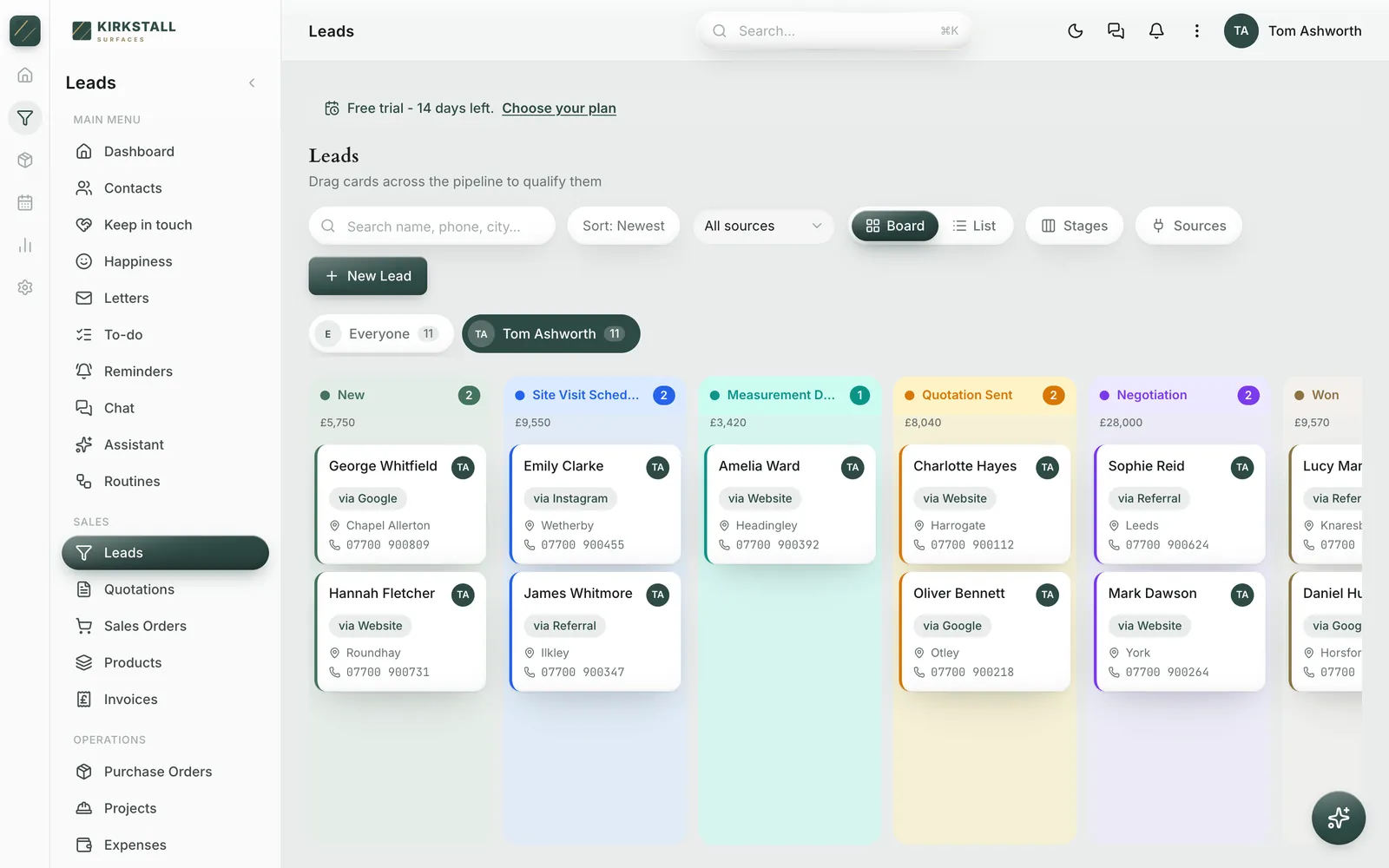
Enquiries arrive on a pipeline: from your website form, a kitchen studio that refers you, Google or Instagram. New, site visit booked, measured, quote sent, negotiating, won. Each column shows what it is worth, and the stages are yours to rename in your own words. Mark a quote as sent and the enquiry moves along by itself. Set a follow-up on any of them and it rings the right phone at the right time.
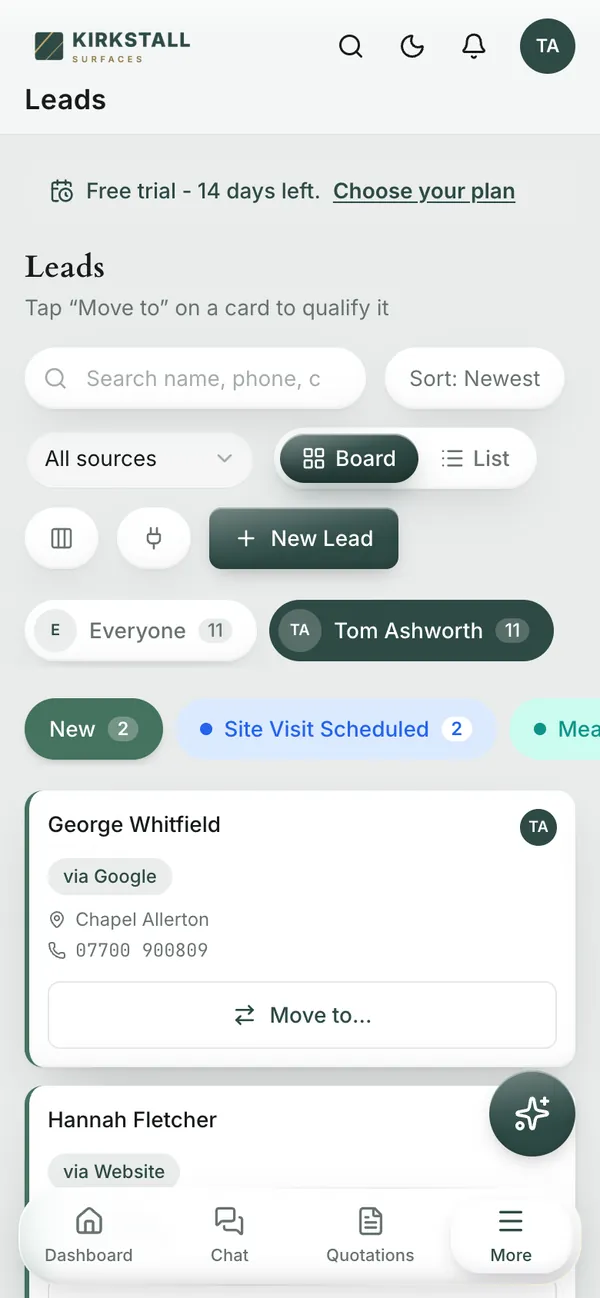
On a phone the board becomes a list for each stage with a Move to button, so it works one-handed in the yard. A trade account that sends you three kitchens a month and a homeowner with one breakfast bar sit on the same board, and every quote, order and payment for each of them is one tap away.
The price
Essential covers the whole business for up to three people: enquiries, quotations, orders, invoices, payments and team chat. Professional is £99 a month for up to fifteen, and Scale is £199 for up to fifty. Much of the software sold to trades charges for every login, which quietly teaches a business to keep the fitters and the office off it. Here the price is for the workshop.
Try it for fourteen days with no card. If you do nothing at the end, nothing is charged: the workspace pauses and your data stays where it is.
Psalm is made by Jordan Labs Ltd, a company registered in England and Wales. It was built inside a working solid surface fabricator that has quoted, invoiced and chased its customers on it every working day since June 2026, which is why the square metres come out right. Read how it started.
Questions from the workshop
Yes. A UK workspace measures in millimetres and bills in square metres. Type a piece as 3000 by 620 and Psalm works out 1.86 square metres at your rate. The sizes print on the quotation exactly as you typed them, and they are never converted.
Each goes on its own line at your price. Upstands are sold by the linear metre, cut-outs, tap holes and drainer grooves by the piece, and the templating visit and removal of old tops as a single charge. The customer sees what each one costs.
Yes. When the customer accepts, turn the quotation into an order and choose the deposit. Psalm splits the total into the deposit due on confirmation and the balance due on the date you set for fitting, prints a proforma invoice for either, and records each payment as it arrives.
Revise the quotation with the measured sizes. The version the customer was first sent is kept, and the link they already hold tells them it has been updated, so nobody can accept a price you have moved on from.
Yes. Send a link by WhatsApp, email or text. It opens on their phone with your logo, every piece and its sizes, and a button to accept or decline, with room for their name and a note. You are told the moment they answer.
No. Essential is £39 a month for up to three people, Professional £99 for up to fifteen, and Scale £199 for up to fifty. The price is for the company, so adding a fitter or the office costs nothing until you outgrow the plan.
Yes. At setup, hand Psalm the spreadsheet you already keep, with the material, the unit and the price, and every item arrives priced. A customer list comes in the same way. Excel, CSV, a PDF or a photo all work.
Fourteen days, with no card. If you do nothing at the end, nothing is charged; your workspace pauses and your data stays where it is until you choose a plan.
Bring your price list, quote one real job, and send it to yourself. Fourteen days free, no card.