
Psalm/Kitchen fitters
For kitchen fitters
Psalm quotes a kitchen the way you build one: strip-out, units, worktops, first fix, fitting days, second fix and making good, each on its own line. Your customer accepts on their phone, the deposit orders the units, and every stage payment lands against the right job.
14 days free, no card. Then £39 a month for three people.
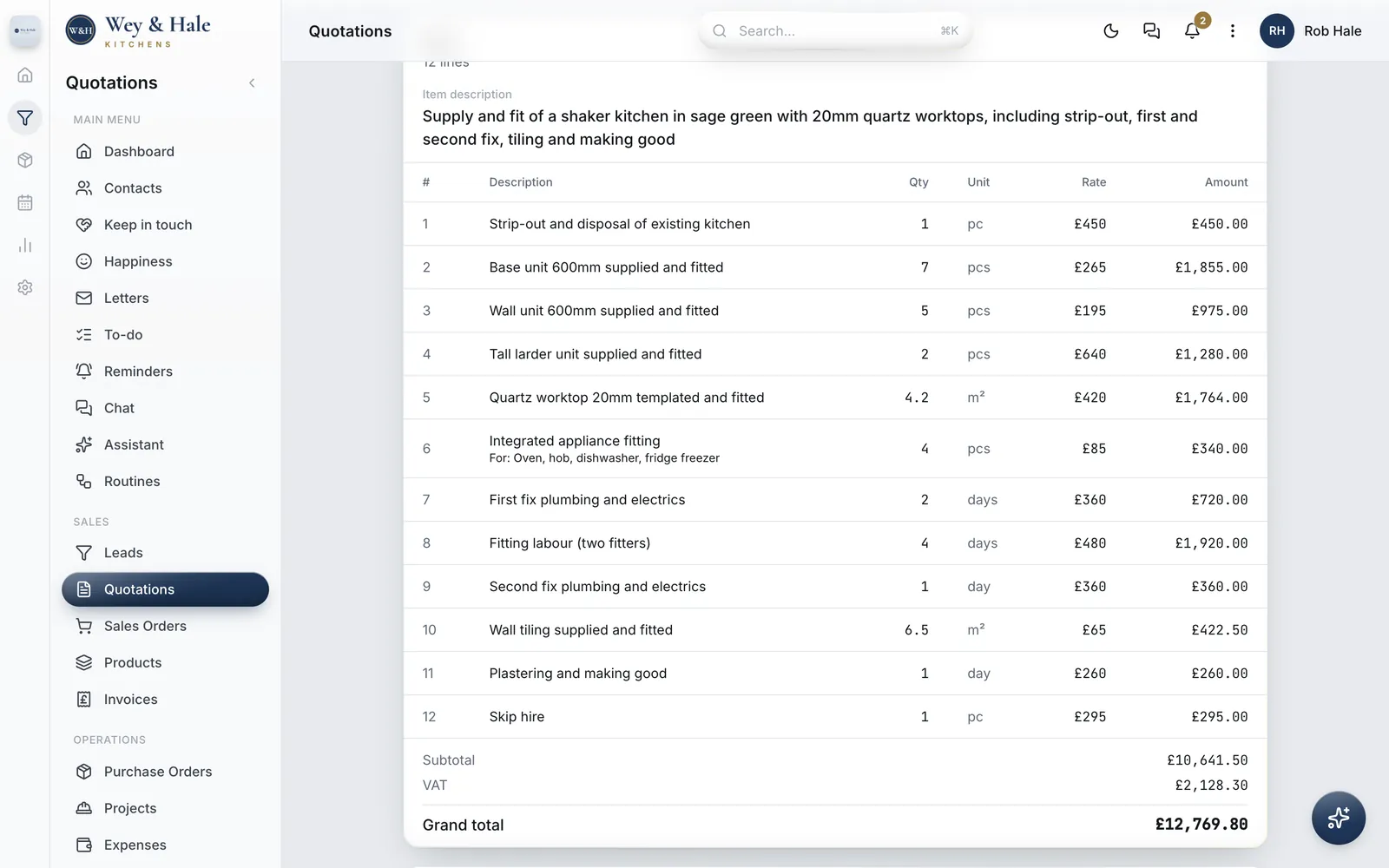
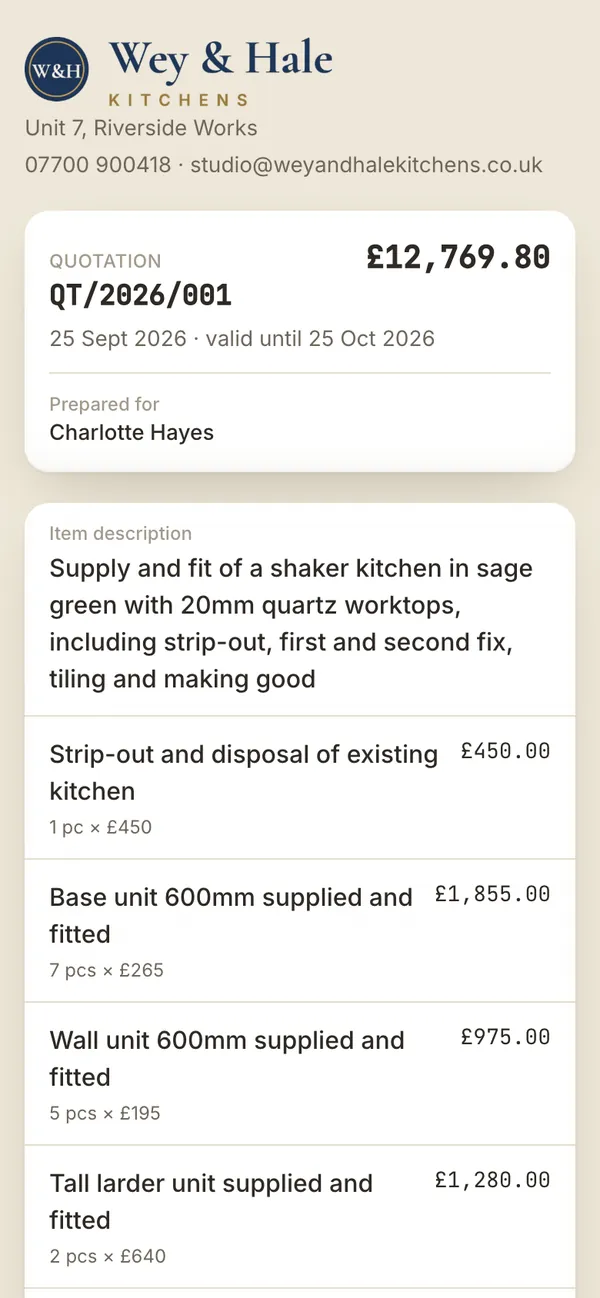
Real Psalm screens, photographed in a demo workspace we set up as a Guildford kitchen fitter. Wey & Hale Kitchens and its customers are invented. The software is not.
The quotation
A kitchen quote is a list of work as much as a list of goods, and Psalm keeps both on one page. Units go on at your supplied and fitted price per unit. Worktops go on by the square metre or the linear metre. First fix, fitting and second fix go on by the day, so a customer who asks why the kitchen takes a week can see the week.
Strip-out, skip hire, tiling, plastering and making good each sit on their own line, and a note under any line says what it covers: oven, hob, dishwasher and fridge freezer. VAT at 20% is worked out as one line underneath, to the penny, and if a line needs a different rate you change it on that line.
Your price list comes in at setup from the spreadsheet you already keep, so the next quote is a matter of picking lines and typing quantities. Write your terms once in Settings: what the deposit is for, when the stage payments fall, what happens if the old kitchen hides a rotten joist. Every quotation carries them. At a design visit with no signal, the quote saves on your phone and takes its number when you are back online.
Sending it
Send the quotation by WhatsApp, by email or as a link. The link opens on the customer's phone with your logo, every line, the total with VAT, your terms and a button to accept or decline. They can leave a note, such as asking whether the fitters can start after half term, and Psalm tells you the moment they answer. The quotation records who said yes and when.
Designs change after the first visit. When they do, revise the quotation: the version the customer was first sent is kept, and the link they already hold tells them it has been updated, so nobody can accept a price you have moved on from.
Deposit to final payment
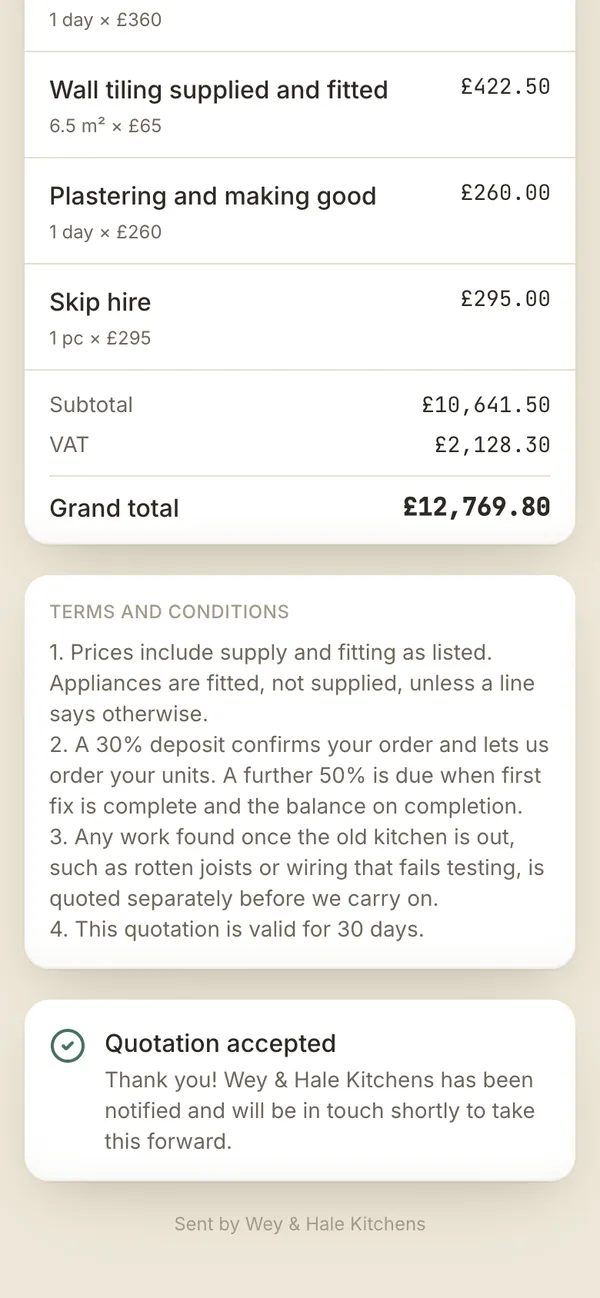
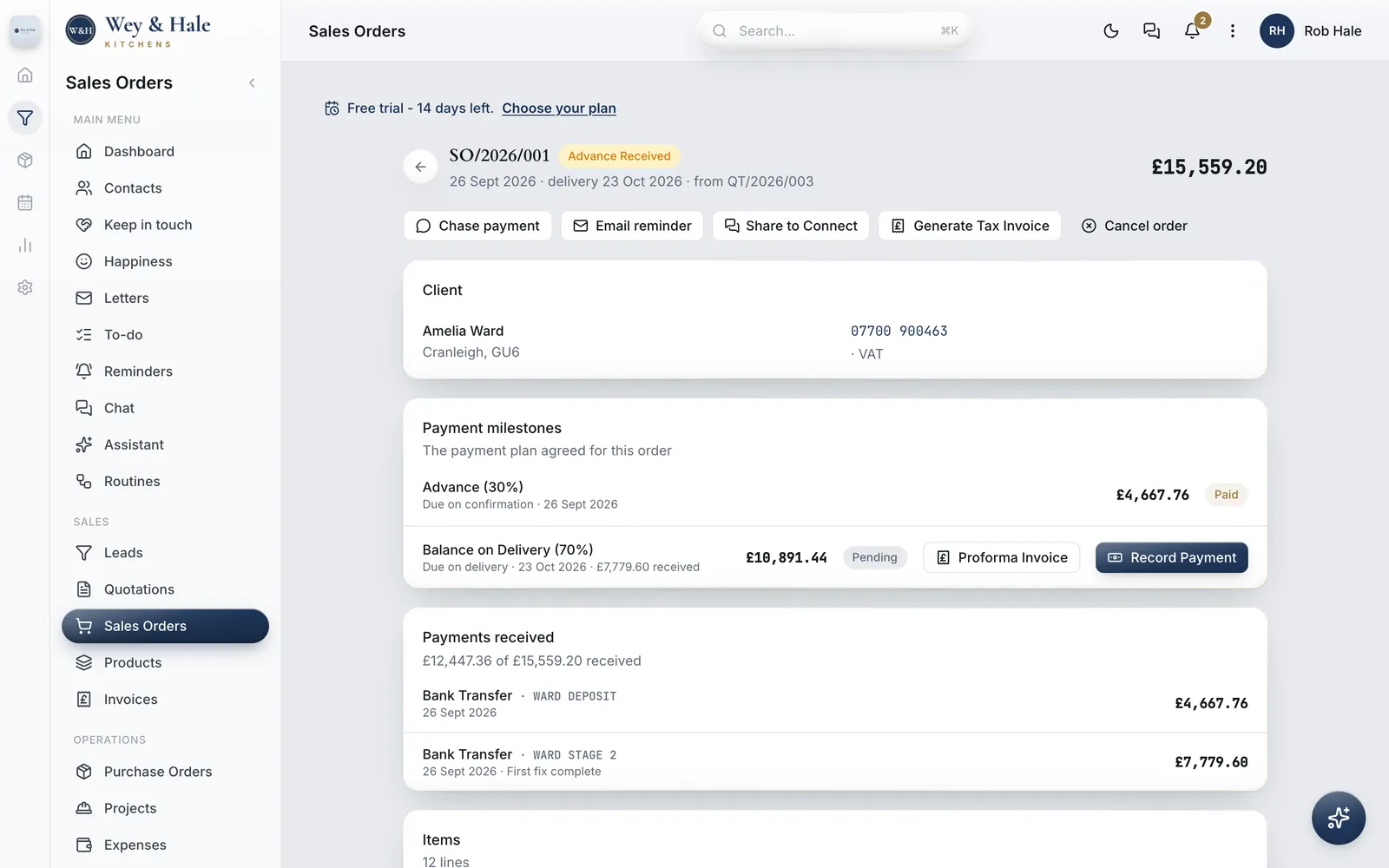
Kitchen money arrives in stages, and it is the easiest thing in the business to lose track of. When a quote is accepted, turn it into an order with one press and set the deposit: 30%, half, whatever it takes to order the units. Psalm splits the total into the deposit due on confirmation and the balance due on the completion date you set, and prints a proforma invoice for either if the customer wants one to pay against.
Payments in between are recorded as they arrive, against the balance, with a note saying what they were for, such as first fix complete. The order shows what has come in and what is still to come, so nobody adds up bank transfers on a Sunday night. When the kitchen is finished, raise the VAT invoice from the order and record the final payment. If it is slow to arrive, the chase message is already written, with the amount, ready to send by WhatsApp or email, and one screen shows everyone who owes you, aged into thirty, sixty and ninety days.
Turn the order into a job with the site address, a materials checklist and the fitters on it with their day rates. The team posts updates from site as the week goes, and when the kitchen is signed off you can see the total the labour cost you, one tap from the order and what you charged.
Enquiries
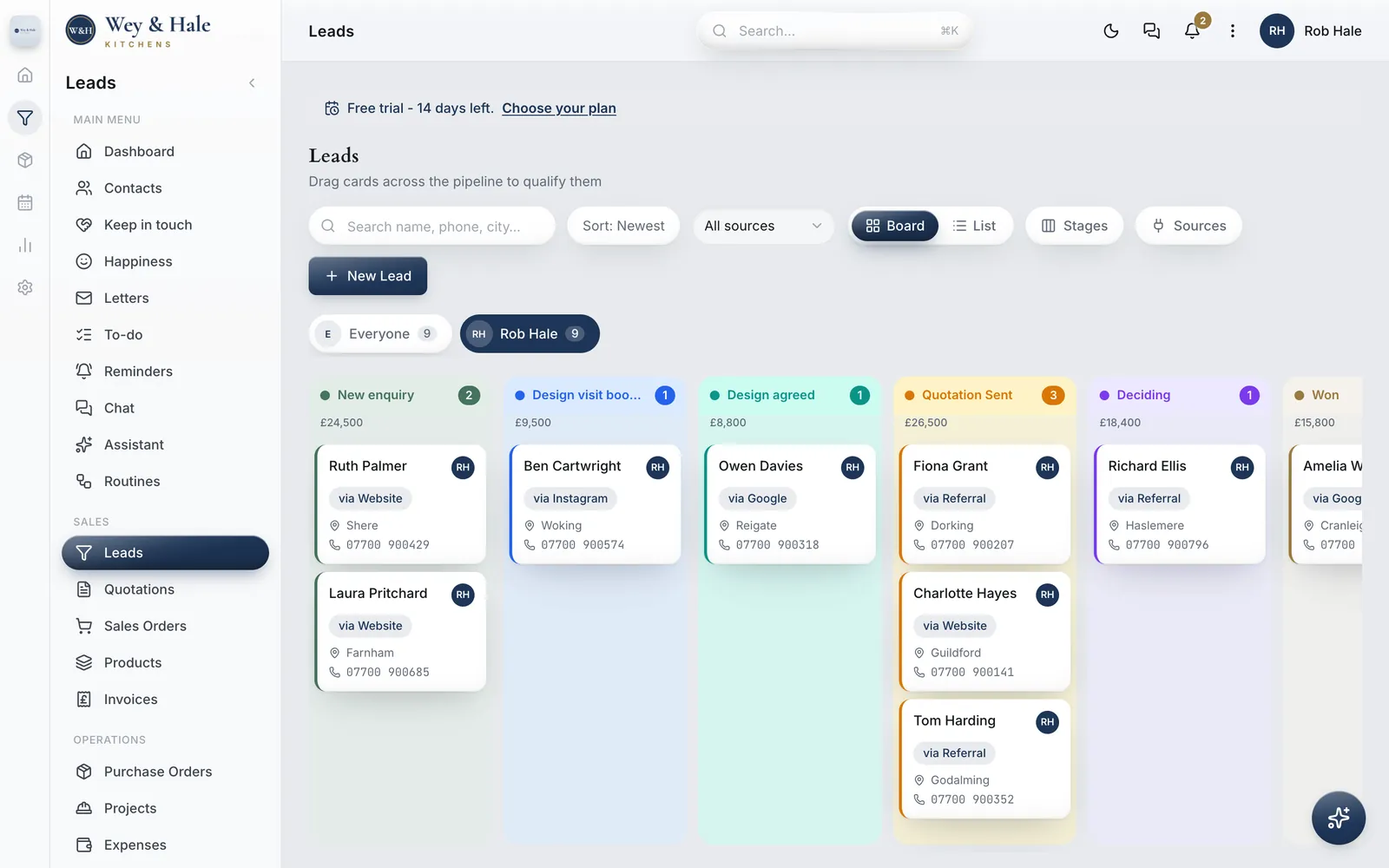
Every enquiry lands on one board with what it is worth: the website form, a referral, Google, Instagram, the couple who walked into the showroom on Saturday. The stages are yours to name. In this workspace they read new enquiry, design visit booked, design agreed, quotation sent and deciding, because that is how a kitchen is sold. Mark a quote as sent and the enquiry moves along by itself.
Set a follow-up on the customer who is comparing you with a national chain and it rings the right phone at the right time. A landlord with three rental flats and a homeowner with a barn conversion sit on the same board, and every quote, order and payment for each of them is one tap away.
The price
Essential covers the whole business for up to three people: enquiries, quotations, orders, invoices, payments and team chat. That is you, your designer and your lead fitter. Professional is £99 a month for up to fifteen, and Scale is £199 for up to fifty. Much of the software sold to trades charges for every login, which quietly teaches a business to keep the fitters off it. Here the price is for the company.
Try it for fourteen days with no card. If you do nothing at the end, nothing is charged: the workspace pauses and your data stays where it is.
Psalm is made by Jordan Labs Ltd, a company registered in England and Wales. It was built inside a working worktop fabricator, a business with the same shape as yours: quote, deposit, order, fit, invoice, chase. It has run that business every working day since June 2026. Read how it started.
Questions from fitters
Yes. Units go on at your supplied and fitted price per unit, worktops by the square metre or linear metre, and first fix, fitting and second fix by the day. Strip-out, skip hire and making good sit on their own lines, with VAT worked out underneath.
When the customer accepts, turn the quotation into an order and choose the deposit. Psalm schedules two payments: the deposit due on confirmation and the balance due on the completion date you set. A stage payment in between, such as one at first fix, is recorded as a part payment against the balance with a note saying what it was for, and the order always shows what is still to pay.
Revise the quotation. The version the customer was first sent is kept, and the link they already hold tells them it has been updated, so nobody can accept a price you have moved on from.
Yes. Send a link by WhatsApp, email or text. It opens on their phone with your logo, every line, your terms and a button to accept or decline, with room for a note. You are told the moment they answer.
Turn the order into a job and put the fitters on it with their day rates, alongside the site address and a materials checklist. When the job is done you can see the total the labour cost you, one tap from the order and what you charged.
No. Essential is £39 a month for up to three people, Professional £99 for up to fifteen, and Scale £199 for up to fifty. The price is for the company, so adding a designer or a fitter costs nothing until you outgrow the plan.
Yes. At setup, hand Psalm the spreadsheet you already keep and every item arrives priced, with its unit. A customer list comes in the same way. Excel, CSV, a PDF or a photo all work.
Fourteen days, with no card. If you do nothing at the end, nothing is charged; your workspace pauses and your data stays where it is until you choose a plan.
Bring your price list, price one real job, and send it to yourself. Fourteen days free, no card.